
Introduction: The Problem Every Professional Knows Too Well
Just imagine: it's Monday morning. You have a compliance deadline on Friday, three client reports due by Wednesday, and a folder full of documents that you last updated two weeks ago. Your reminders are spread across three different apps, your spreadsheets are outdated, and somewhere in your inbox is an email to which you have not answered yet.
Does this sound familiar? If you're a professional, whether you're a chartered accountant, a company secretary, a legal advisor, or a business owner, this chaos can be more than just stressful; this is risky. Missing deadlines can result in penalties, disorganised documents can lead to mistakes, and trying to manage too many tools at once often signifies that important tasks are skipped.
EazeMax was created specifically to address this issue. In this guide, we will explain everything you need to know in clear and simple terms. By the time you finish reading, you'll feel confident about EazeMax, its function, and how it can transform the way you work every day.
EazeMax Software
The EazeMax Compliance , Tasks & Documents Management Software is a computer or a device designed for professionals who need to manage tasks, track legal and statutory compliance requirements, and organise important documents, all in one place.
Many professionals today rely on several different tools to manage their work. They might use a to-do app for tasks, a spreadsheet for compliance deadlines, a cloud folder for documents, and a calendar full of reminders. While each of these tools works well on its own, using them together can be cumbersome. Frequent switching between apps is required, information may not sync properly, redundancy can occur, and if one tool fails or becomes disorganised, the entire system can break down.
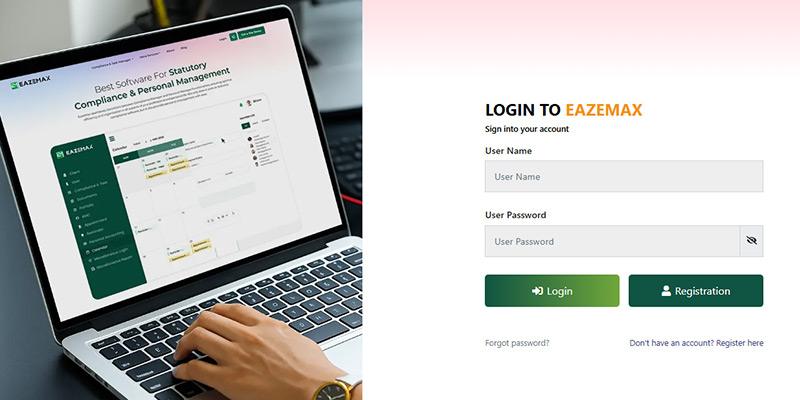
EazeMax eliminates this chaotic collection of tools with a single, unified platform. Instead of juggling 5 different apps, you simply log into EazeMax, where everything is readily accessible—your tasks, deadlines, compliance calendar, and documents. It is developed to be the central hub where your professional life comes together clearly and efficiently.
The word "EazeMax" reflects the software's goal: to maximise ease. For professionals operating in complex, high-stakes environments, that ease is not just a luxury; it's a need.
Why Professionals Need a Tool Like EazeMax
To comprehend the significance of EazeMax, it assists in comprehending the hurdles that professional encounters in the fields of accounting, law, and business management.
Compliance Requirements Are Not Optional : Professionals like chartered accountants and company secretaries in India and in foreign countries are legally mandated to fulfil the set filing due dates and statutory liabilities. Skipping such due dates even by a day can cause financial penalties, legal consequences, or harm your professional reputation. The manual tracking of these provisions is exhausting and risky, particularly when handling multiple clients.
Document Management Is Intricate : In the midst of a typical professional's week, dozens of important documents change hands: contracts, returns, certificates, reports, and correspondence. Storing these in email attachments and scattered folders is inefficient and insecure. Finding a document from three months ago during an urgent situation should not take 20 minutes of searching.
Task Overload Is Real : When you are handling multiple clients, projects, or departments, the number of tasks can become overwhelming quickly. Crucial operations get delayed or overlooked due to not having a clear system of prioritising and tracking these tasks.
Manual Systems Cause Errors : Mistakes may occur when you depend on memory, paper notes, or basic spreadsheets to manage your work. Errors like a wrongly entered date, a reminder that didn't fire, or a document filed in the incorrect folder might have serious professional consequences.
EazeMax was developed to address all of these challenges. It not only organises your work but also actively helps you avoid the mistakes and oversights that can cost professionals time, money, and peace of mind.
Features of EazeMax
Let's explore the features of EazeMax to understand what each one does and why they are important for you as a professional.
1. Task Management: Your Work, Under Control
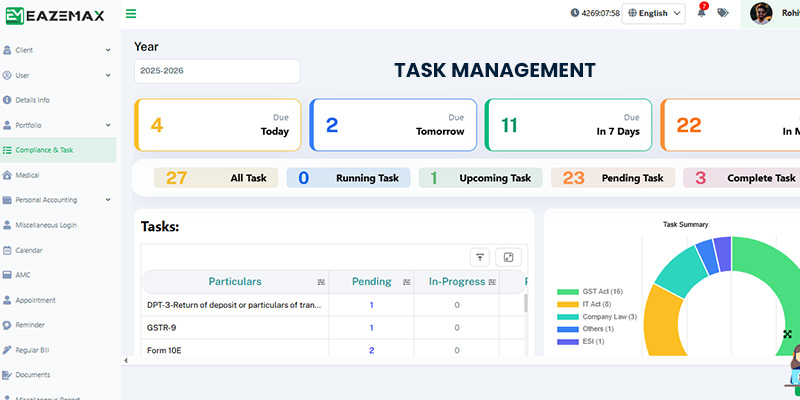
Task management is a feature of EazeMax. It is a robust, professional-grade to-do system. However, it is more than just a simple checklist.
When you create a task in EazeMax, you have the option to assign a deadline, set a priority level (high, medium, or low), and attach the task to a specific client or project. If you collaborate with others, you can also assign the task to a team member. Additionally, you can set reminders to ensure that both you and your team receive notifications as the deadline approaches.
Its feature to see all your tasks in one organised view makes it special. You can open EazeMax, and your tasks are right there, sorted, prioritised, and colour-coded for quick understanding instead of digging through your notebook or scrolling through a long email thread to find the pending tasks.
For professionals handling multiple clients, this is a game-changer. You will no longer ask yourself, "What did I forget today?" EazeMax has the answer.
2. Compliance Management: Stay Legal, Stay Stress-Free
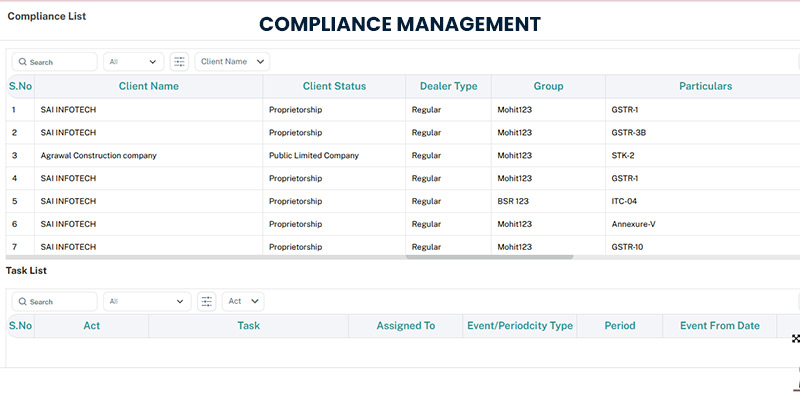
Statutory compliance refers to the legal obligations that businesses and professionals need to complete, such as filing GST returns, submitting income tax forms, meeting ROC (Registrar of Companies) deadlines, and fulfilling requirements under the Companies Act, Income Tax Act, and other legislation. Keeping track of all such due dates for CAs and CS having dozens of clients is a full-time job.
EazeMax eases the same procedure by keeping an organised compliance calendar that tracks all pertinent due dates. It gives you an alert in advance when a filing is due. It authorises you to mark tasks as completed and keeps records of what was filed and when. It supports you in ensuring that no obligations, deadlines, or forms are skipped.
The outcome is that you do not need to spend time thinking about what's coming next, and you can spend more time doing work. Your compliance procedure becomes predictable, transparent, and reliable.
3. Document Management: Find What Your Require
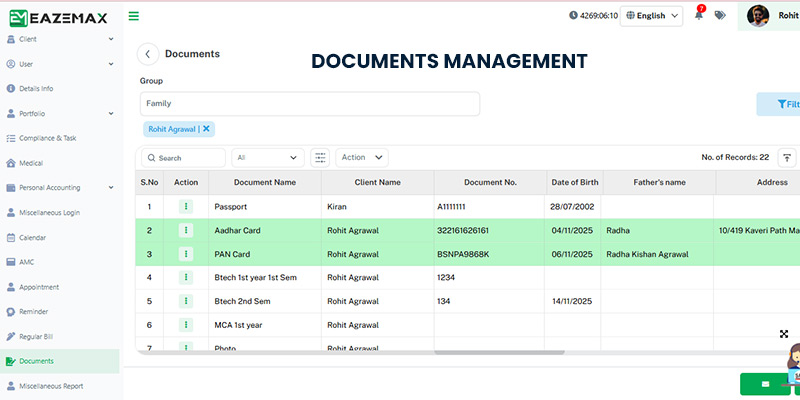
If you can find a document quickly in professional life, then the document has some value. You can get a secure, organised digital filing system from EazeMax's document management feature, where you can store all your crucial files.
You are able to upload documents directly to the platform, organise them into folders by client, category, or date, and access them from any device at any time. The search function allows you to locate any document in a few seconds. Due to the reason that the platform is cloud-based and secure, you don't need to worry about losing files or having them accessed by unauthorised people.
For professionals who depend on shared hard drives, email attachments, or patchwork cloud storage setups, this feature can save hours every week.
4. Intuitive Dashboard: Your Command Centre
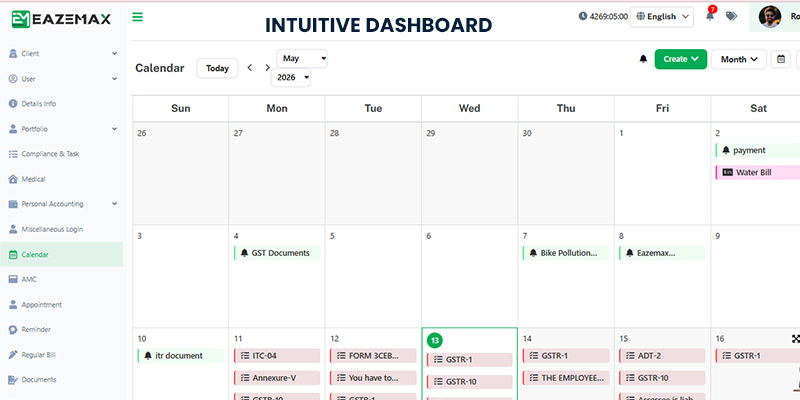
On logging in to EazeMax, the first thing you see is the dashboard. It is created to provide you with an instant, clear picture of all the things that are crucial.
In one frame, you can see which tasks are not completed, which due date is approaching, which compliance liabilities are not fulfilled, and what your team is working on. The dashboard can be customised, which means you can arrange it to display the information that's most relevant to your operation.
For beginners, the same is reassuring. You do not require technical expertise to comprehend what's on your dashboard. It is created to be read and understood quickly, without effort.
5. Secure Data Management: Your Information Is Safeguarded
Personal information security is important when you are dealing with sensitive client data, financial records, and legal documents.
EazeMax uses industry-standard security measures to safeguard the information stored on the platform. It comprises encrypted storage, secure login protocols, and controlled access settings that authorise you to decide who can see what in your workspace.
For professionals bound by legal and ethical confidentiality mandates, this rigorous security framework is a cornerstone of EazeMax's reliability.
Advantages: What Revises When You Use EazeMax
Beyond the feature list, what is the lived experience of using EazeMax? Here is how the platform transforms the daily workflows and professional lives of our users.
Enhances productivity
Your mental energy will be free to do operations when routine tasks like setting reminders, tracking deadlines, and searching for documents are automated or facilitated. You will start thinking clearly, and your mistakes will decrease, accomplishing more work.
Decreases stress
The fear of forgetting something crucial carries stress in professionals life. This stress can be resolved by EazeMax. EazeMax provides total oversight, ensuring every deadline is monitored, every task is transparent, and every document is perfectly organised.
Enhances reputation
Consistently meeting deadlines, responding promptly to clients, and maintaining meticulous records make an impact. Clients and employers take note. Ultimately, a well-organised professional is a trusted professional.
Team works effectively
EazeMax's collaboration features for professionals working in teams signify that everyone can see shared tasks, track collective progress, and communicate clearly. You will spend time on execution instead of coordination.
Fewer costly errors
EazeMax automates reminders and centralises details, which lessens the possibility of human error. There is a lesser possibility of missing the compliance due date tracked by software than one remembered by a person juggling dozens of other responsibilities.
Clear visibility
With a customisable dashboard, you can see everything at a glance — pending tasks, upcoming deadlines, compliance status — all without digging through email threads or spreadsheets.
What Is The Way To Get Started With EazeMax?
The operations of the EazeMax are seamless, even if you do not know much about technology. Its operation is illustrated below—
Step 1 : Sign Up And Create Your Account
Go to the EazeMax platform and register with your basic information. You will set up a workspace that becomes your personal professional hub within the software.
Step 2 — Customise Your Dashboard
Once you're in, take some time to configure your dashboard as per your work style. Categories you work with most, compliance, client tasks, internal projects, and arrange them so your most important information is front and centre.
Step 3 — Add Your Tasks and Deadlines
Start entering the system with your current workload. Enter tasks, assign deadlines, and set priorities. If you handle multiple clients, create separate spaces or categories for each one. Leverage the reminder feature to confirm you're alerted before deadlines arrive.
Step 4 — Upload and Organise Your Documents
Centralise your essential files by migrating them into the EazeMax document management system. To maximise efficiency, establish a folder tailored to your workflow—whether organised by client name, document type, or filing period. Investing time in logical organisation now ensures seamless retrieval and saves significant effort when you need to locate critical information later.
Step 5 — Track, Review, and Adjust
The daily use of a dashboard to check your progress is a must. Take a view of completed tasks, see the forthcoming responsibilities, and update the system with the change in operations. It adds value with your consistent usage.
Getting Started with EazeMax: A Beginner's Guide to Success
For those new to EazeMax, implementing these foundational practices will ensure a seamless transition and immediate efficiency within the system.
💡 Beginner Best Practices
- Start easy and move gradually. You must not try using every feature at once in your first week. Start with task management and basic reminders; thereafter, see compliance tracking and advanced document organisation.
- Make a habit of updating the system. With the most updated information, EazeMax works effectively. Take 5 minutes at the beginning or at the end of each working day to update tasks, mark completed items, and review what's coming next.
- Use descriptive names for everything. When naming tasks, documents, and folders, be specific. "Client A GST Return Q1 FY2025" is more effective than "GST" when you need to find something three months later.
- Do not skip the reminders. The alert system of EazeMax is valuable when you respond to it. On getting a reminder, take action or reschedule it. You must not dismiss it and hope you will remember.
- Use the benefit of reports to show your performance. EazeMax generates reports that exhibit the way you handle your workload. The periodic review of these shall support you to spot patterns, tasks that consistently run late, compliance areas that require attention, or team members who desire support.
Mistakes to Avoid
Sometimes beginners find themselves in a hurdle with any new tool. However awareness about it in advance shall make your confidence high.
⚠️ Common Mistakes to Watch Out For
- It is crucial to update the system. If you add a task and don't update it with the progression of work, then the dashboard will see irregularities. The EazeMax platform relies on accurate, updated information.
- Uploading documents by not having a clear naming or filing convention is another problem. On dumping files into the system without organization, you have just moved your chaos from one place to another. Take some time to form a structure that will serve you effectively.
- If you are in a compliance-related profession, then skipping compliance features points to a missed opportunity. Such features are crucial because compliance management is demanding. It is one of the first things you should establish as a CA or CS.
- If you're working with a team, full integration is key. EazeMax's collaboration tools are most effective when the entire group is active on the platform. By encouraging early adoption among your colleagues, you ensure that shared tasks and deadlines remain transparent and accessible to everyone involved.